![[HaBo]](/styles/default/logoklein.png)

dhubs
Stammuser
RapidRAW v1.6.6 wurde vor zwei Stunden veröffentlicht und ist ab sofort für Windows, macOS, Linux und Android verfügbar :: Für alle, die ihre RAW-Fotos schnell sichten und vorsortieren wollen, ist das Projekt (unterstützt von mittlerweile über 86 Entwicklern) 
 weiterhin sehr interessant. Kurz eingeordnet: RapidRAW versteht sich weniger als vollwertiger Lightroom-Ersatz, sondern eher als sehr performanter RAW-Viewer mit grundlegenden Editierfunktionen – ideal für Culling, Vorauswahl und erste Anpassungen. Jetzt sind einige wichtige Tools und Funktionen hinzugekommen - echte Meilensteine und wie bereits erwähnt kommt die Version 1.6.6 heute heraus und Timo ist "thrilled to share a massive new update centered around spatial creativity, intelligent automation, and raw processing precision."
guten Abend liebe Hackerboard-Community ,
,
Timo über seine Entwicklung:..... RapidRAW is a modern, high-performance alternative to Adobe Lightroom®. It delivers a simple, beautiful editing experience in a lightweight package (under 20MB) for Windows, macOS, and Linux. und Timon weiter: "I am excited to bring you a new update that significantly expands your retouching toolkit and refines how your images are processed under the hood. This release focuses heavily on local adjustments and HDR merging, introducing highly requested manual clone and heal tools for precise control, alongside major updates to AI inpainting, shadow shaders, and HDR alignment."
RapidRAW v1.6.6 kommt heute am Sonntag den 18. Oktober mit entscheidenden Neuigkeiten:
Link: https://github.com/CyberTimon/RapidRAW/releases
Timo (Zitat) vor zwei Stunden:
I am thrilled to share a massive new update centered around spatial creativity, intelligent automation, and raw processing precision. This release transforms the editing workspace with an innovative 2.5D spatial engine that brings dynamic relighting, ray-traced shadows, and volumetric fog straight into your scenes, while bringing major workflow speedups through one-click auto-straightening and a fully non-destructive AI denoiser integrated directly into the develop pipeline. Paired with RAW baseline exposure compensation, interactive on-canvas focal points for vignettes and centré presence, granular per-tool visibility toggles, and multi-threaded rendering optimizations across all platforms, this release gives you complete creative command and control over every photo in your library.
New Features
Under the hood, the system automatically analyzes the scene to estimate a depth map and derive surface normal maps. By reconstructing surface orientations (normals) and distance (depth), the rendering pipeline can accurately compute how light bounces off surfaces, handle specular/diffuse falloff, cast occlusion shadows, and drive depth-aware atmospheric effects like ground fog and lens blur.
Volumetric & Ground Fog
Leveraging the estimated scene geometry, you can simulate realistic atmospheric haze and ground fog that naturally wraps around objects based on their height and distance from the camera:
uires generating massive duplicate files, as AI Denoise is now built directly into the main editing pipeline. Previously, running the denoiser meant triggering a context menu action that produced an enormous standalone TIFF file with compressed dynamic range. Now, it operates as a native, non-destructive tool inside the Details panel, preserving the full dynamic range of your original image with zero quality loss. Dedicated sliders for reduction strength and fine detail recovery give you complete control over texture without locking you in.
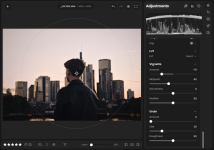
Quelle Link: https://github.com/CyberTimon/RapidRAW/releases
Fazit: Gerade für Nutzer, die große RAW-Serien schnell durchgehen möchten, bleibt RapidRAW eine spannende Option im Linux-Ökosystem. Ein Clip von Anthony Morganti zeigt noch mehr: The New FREE Lightroom Clone Everybody is Talking About – RapidRAW
Stats: 142 000 views :: 5600 likes :: 150 comments
Mich würde interessieren, wie sie sich im Vergleich zu darktable / ART / RawTherapee im täglichen Workflow schlägt.
By the way: die Unterstützung - die geht noch viel viel weiter - vgl. die Github-Seite:
By the way: die Unterstützung - die geht noch viel viel weiter - vgl. die Github-Seite:
A huge thank you to the following projects and tools that were very important in the development of RapidRAW:
weitere Infos - mehr Hintergründe:
die neue Webseite des Projekts: RapidRAW: Lightweight RAW Editor
die Projektseite: GitHub - GitHub:: GitHub - CyberTimon/RapidRAW: A beautiful, non-destructive, and GPU-accelerated RAW image editor built with performance in mind.
CyberTimon/RapidRAW: A beautiful, non-destructive, and GPU-accelerated RAW image editor built with performance in mind.
die aktuelle Version: https://github.com/CyberTimon/RapidRAW/releases
Euch allen hier auf dem Hackerboard einen schönen Sonntagabend,
weiterhin sehr interessant. Kurz eingeordnet: RapidRAW versteht sich weniger als vollwertiger Lightroom-Ersatz, sondern eher als sehr performanter RAW-Viewer mit grundlegenden Editierfunktionen – ideal für Culling, Vorauswahl und erste Anpassungen. Jetzt sind einige wichtige Tools und Funktionen hinzugekommen - echte Meilensteine und wie bereits erwähnt kommt die Version 1.6.6 heute heraus und Timo ist "thrilled to share a massive new update centered around spatial creativity, intelligent automation, and raw processing precision." guten Abend liebe Hackerboard-Community
,Timo über seine Entwicklung:..... RapidRAW is a modern, high-performance alternative to Adobe Lightroom®. It delivers a simple, beautiful editing experience in a lightweight package (under 20MB) for Windows, macOS, and Linux. und Timon weiter: "I am excited to bring you a new update that significantly expands your retouching toolkit and refines how your images are processed under the hood. This release focuses heavily on local adjustments and HDR merging, introducing highly requested manual clone and heal tools for precise control, alongside major updates to AI inpainting, shadow shaders, and HDR alignment."
RapidRAW v1.6.6 kommt heute am Sonntag den 18. Oktober mit entscheidenden Neuigkeiten:
Link: https://github.com/CyberTimon/RapidRAW/releases
Timo (Zitat) vor zwei Stunden:
I am thrilled to share a massive new update centered around spatial creativity, intelligent automation, and raw processing precision. This release transforms the editing workspace with an innovative 2.5D spatial engine that brings dynamic relighting, ray-traced shadows, and volumetric fog straight into your scenes, while bringing major workflow speedups through one-click auto-straightening and a fully non-destructive AI denoiser integrated directly into the develop pipeline. Paired with RAW baseline exposure compensation, interactive on-canvas focal points for vignettes and centré presence, granular per-tool visibility toggles, and multi-threaded rendering optimizations across all platforms, this release gives you complete creative command and control over every photo in your library.
New Features
Spatial Effects & 2.5D Relighting
I’ve added a brand-new Spatial Effects section that transforms flat 2D images into interactive 2.5D environments in real time.Under the hood, the system automatically analyzes the scene to estimate a depth map and derive surface normal maps. By reconstructing surface orientations (normals) and distance (depth), the rendering pipeline can accurately compute how light bounces off surfaces, handle specular/diffuse falloff, cast occlusion shadows, and drive depth-aware atmospheric effects like ground fog and lens blur.
Real-Time Relighting (Point, Spot & Directional Lights)
Using the generated normal maps, you can place dynamic light sources directly into your scene with realistic surface response.Ray-Traced Shadows
The relight engine can also cast realistic shadows emitted from newly placed lights by ray-marching against the reconstructed depth buffer:Volumetric & Ground Fog
Leveraging the estimated scene geometry, you can simulate realistic atmospheric haze and ground fog that naturally wraps around objects based on their height and distance from the camera:
uires generating massive duplicate files, as AI Denoise is now built directly into the main editing pipeline. Previously, running the denoiser meant triggering a context menu action that produced an enormous standalone TIFF file with compressed dynamic range. Now, it operates as a native, non-destructive tool inside the Details panel, preserving the full dynamic range of your original image with zero quality loss. Dedicated sliders for reduction strength and fine detail recovery give you complete control over texture without locking you in.
Quelle Link: https://github.com/CyberTimon/RapidRAW/releases
Custom Center Point for Vignette & Centré
Framing off-center subjects is now much easier with interactive center positioning for Vignette and Centré adjustments. Instead of being locked to the middle of the frame, you can now drag an on-canvas pin directly over your subject to draw the viewer's eye exactly where you want it. A subtle, real-time contour overlay shows you the exact shape and falloff of the effect as you position it, and double-clicking the marker instantly snaps it back to the center, giving you precise compositional control for portraits and dynamic compositions.Fazit: Gerade für Nutzer, die große RAW-Serien schnell durchgehen möchten, bleibt RapidRAW eine spannende Option im Linux-Ökosystem. Ein Clip von Anthony Morganti zeigt noch mehr: The New FREE Lightroom Clone Everybody is Talking About – RapidRAW
Stats: 142 000 views :: 5600 likes :: 150 comments
Mich würde interessieren, wie sie sich im Vergleich zu darktable / ART / RawTherapee im täglichen Workflow schlägt.
By the way: die Unterstützung - die geht noch viel viel weiter - vgl. die Github-Seite:
By the way: die Unterstützung - die geht noch viel viel weiter - vgl. die Github-Seite:
A huge thank you to the following projects and tools that were very important in the development of RapidRAW:
- Google AI Studio: For providing amazing assistance in researching, implementing image processing algorithms and giving an overall speed boost.
- rawler: For the excellent Rust crate that provides the foundation for RAW file processing in this project.
- lensfun: For its invaluable open-source library and comprehensive database for automatic lens correction.
- LaMa: For the powerful & simple image inpainting model, which enables content-aware fill and object removal.
- SAM 2: For providing the foundation model used for the AI subject detection capabilities.
- U-2-Net: For providing the robust architecture used for the AI sky and foreground detection capabilities.
- Depth Anything V2: For the powerful monocular depth estimation model that enables the AI depth masking capabilities.
- nind-denoise: For providing AI models that power the AI noise reduction capabilities in RapidRAW.
- NegPy: For the inspiration behind the negative conversion logic, particularly the mathematical approach to film inversion using characteristic curves.
- pixls.us: For being an incredible community full of knowledgeable people who offered inspiration, advice, and ideas.
- darktable & co.: For some reference implementations that guided parts of this work.
- You: For using and supporting RapidRAW. Your interest keeps this project alive and evolving.
weitere Infos - mehr Hintergründe:
die neue Webseite des Projekts: RapidRAW: Lightweight RAW Editor
die Projektseite: GitHub - GitHub:: GitHub - CyberTimon/RapidRAW: A beautiful, non-destructive, and GPU-accelerated RAW image editor built with performance in mind.
CyberTimon/RapidRAW: A beautiful, non-destructive, and GPU-accelerated RAW image editor built with performance in mind.
die aktuelle Version: https://github.com/CyberTimon/RapidRAW/releases
Euch allen hier auf dem Hackerboard einen schönen Sonntagabend,
Zuletzt bearbeitet: