![[HaBo]](/styles/default/logoklein.png)

dhubs
Stammuser
LXQt ist eine freie Desktop-Umgebung für Unix und andere POSIX-kompatible Plattformen, wie Linux oder BSD - mit dem Wayland-Support seit einem Jahr: Es kommt mit einer Vielzahl an Komponenten und ist bezogen auf den Ressourcenhunger doch sehr anspruchslos: LXQT: ja das ist das Desktop-Environment, das ausgesprochen schlank (braucht sehr wenig RAM) ist, und hat aufs Ganze gesehen sehr tolle Features, und ja - es ist LXQT praktisch egal ist wie alt euer PC ist... 
guten Morgen liebe Hackerboard-Community
vorweg Frohe Ostern euch allen.
es gibt richtig gute Neuigkeiten zum lxqt-de
ja das ist das Desktop-Environment, das ausgesprochen schlank ( braucht im Grunde fast kein RAM [Details unten] ) ist und vielen tollen Features daherkommt: Das beste: es praktisch egal ist wie alt euer PC ist...
LXQT-Kerneigenschaften:
Point Releases lxqt-config 2.3.2 und lxqt-panel-2.3.3 vom Donnerstag den 2 April, 2026
hier die Meldung - mal unübersetzt:
Ein Blick auf die DE:
Ein Blick auf die DE:
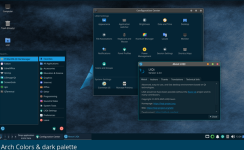
Quelle: https://lxqt-project.org/
The LXQt team announces point releases of lxqt-config 2.3.2 and lxqt-panel 2.3.3.
 lxqt-project.org
Changes in both:
Fixed too strict parsing of icon themes with Qt6.11, which caused empty icon themes settings.
Changes in lxqt-panel:
Prioritize starting strings of titles with Fancy Menu’s filtering.
Disabled shortcutselector in panel menus on Wayland and show tooltip information.
Qt 6.10 version check for filterstring.
Removed obsolete Qt5 version check.
Fixed auto-hiding on dragging over Task Manager and Show Desktop.
KeyboardInteractivityNone also for labwc (0.9.4).
Added tooltip to opacity slider to communicate value.
Cleaned up some ui files.
Updated translations and code cleanup.
The releases can be downloaded from Github: lxqt-panel, lxqt-config.
hier noch ein paar weitere Infos: LXQt Panel#
 lxqt-project.org
Settings are accessible by right clicking on free space on the panel or its plugins (except window buttons in task manager) and can be blocked completely checking the last item to prevent accidental changes or removals of plugins.
Plugins can be configured either by right clicking or by Panel Settings → Plugin → icon "..."
Menu Files#
Right click the panel's "Main Menu" or "Fancy Menu" widget and choose Configure → Menu File. The following files belong to LXQt: * lxqt-applications-fm.menu: Used by PCManFM-Qt in menu://Applications; not quite relevant to lxqt-panel. * lxqt-config.menu: used by "Configuration Center"; not relevant to lxqt-panel. * lxqt-applications.menu: The default menu. * lxqt-applications-compact.menu Can be used in both Mainmenu and Fancymenu, in Mainmenu it will generate a two-level layout
Welcome to the LXQt wiki https://lxqt-project.org/wiki/
This is the wiki of LXQt, a free and open source lightweight desktop environment.
zwei Videos - die zeigen noch mehr: a. Xfce vs LXQt: Which Lightweight Linux Desktop Should You Choose?
b. Every Linux Desktop Environment Explained in 1 minute
ein Blick auf die LXQt-Komponenten
Wie LXDE oder Xfce ist auch LXQt modular aufgebaut. Folgende Komponenten sind vorhanden:[23]
Systemanforderungen
LXQt benötigt etwas mehr Arbeitsspeicher (RAM) als der Vorgänger LXDE. Daher gilt auch hier: weniger als 512 MiB RAM sind nicht empfehlenswert, in der Praxis darf es auch gerne deutlich mehr sein. Damit liegen die Hardwareanforderungen in etwa auf dem Niveau von Xfce bzw. leicht darüber. So reiht sich LXQt wie MATE ins Mittelfeld ein, was die benötigten Systemressourcen betrifft.
Quelle https://de.wikipedia.org/wiki/LXQt
Euch noch einen schönen Ostersonntag.
guten Morgen liebe Hackerboard-Community
vorweg Frohe Ostern euch allen.
es gibt richtig gute Neuigkeiten zum lxqt-de
ja das ist das Desktop-Environment, das ausgesprochen schlank ( braucht im Grunde fast kein RAM [Details unten] ) ist und vielen tollen Features daherkommt: Das beste: es praktisch egal ist wie alt euer PC ist...
LXQT-Kerneigenschaften:
- Sehr schnell. - auch im Start bereits schon ziemlich schnell.
- Apps starten praktisch fast sofort.
- Das Menü - es erscheint direkt nach dem Drücken der Tastenkombination.
- Das Verschieben von Fenstern ist ausgeprochen flüssig.
- Fensteranimationen sind schnell.
Point Releases lxqt-config 2.3.2 und lxqt-panel-2.3.3 vom Donnerstag den 2 April, 2026
hier die Meldung - mal unübersetzt:
Ein Blick auf die DE:
Ein Blick auf die DE:
Quelle: https://lxqt-project.org/
The LXQt team announces point releases of lxqt-config 2.3.2 and lxqt-panel 2.3.3.
Point Releases lxqt-config 2.3.2 and lxqt-panel-2.3.3 | LXQt
The LXQt team announces point releases of lxqt-config 2.3.2 and lxqt-panel 2.3.3.
lxqt-project.org
Changes in both:
Fixed too strict parsing of icon themes with Qt6.11, which caused empty icon themes settings.
Changes in lxqt-panel:
Prioritize starting strings of titles with Fancy Menu’s filtering.
Disabled shortcutselector in panel menus on Wayland and show tooltip information.
Qt 6.10 version check for filterstring.
Removed obsolete Qt5 version check.
Fixed auto-hiding on dragging over Task Manager and Show Desktop.
KeyboardInteractivityNone also for labwc (0.9.4).
Added tooltip to opacity slider to communicate value.
Cleaned up some ui files.
Updated translations and code cleanup.
The releases can be downloaded from Github: lxqt-panel, lxqt-config.
hier noch ein paar weitere Infos: LXQt Panel#
LXQt Panel - LXQt Wiki
lxqt-project.org
Settings are accessible by right clicking on free space on the panel or its plugins (except window buttons in task manager) and can be blocked completely checking the last item to prevent accidental changes or removals of plugins.
Plugins can be configured either by right clicking or by Panel Settings → Plugin → icon "..."
Menu Files#
Right click the panel's "Main Menu" or "Fancy Menu" widget and choose Configure → Menu File. The following files belong to LXQt: * lxqt-applications-fm.menu: Used by PCManFM-Qt in menu://Applications; not quite relevant to lxqt-panel. * lxqt-config.menu: used by "Configuration Center"; not relevant to lxqt-panel. * lxqt-applications.menu: The default menu. * lxqt-applications-compact.menu Can be used in both Mainmenu and Fancymenu, in Mainmenu it will generate a two-level layout
Welcome to the LXQt wiki https://lxqt-project.org/wiki/
This is the wiki of LXQt, a free and open source lightweight desktop environment.
zwei Videos - die zeigen noch mehr: a. Xfce vs LXQt: Which Lightweight Linux Desktop Should You Choose?
b. Every Linux Desktop Environment Explained in 1 minute
ein Blick auf die LXQt-Komponenten
Wie LXDE oder Xfce ist auch LXQt modular aufgebaut. Folgende Komponenten sind vorhanden:[23]
- compton-conf – Konfiguration des Composite-Managers Compton
- lximage-qt – Bildbetrachter
- lxqt-about – Informationen zu LXQt
- lxqt-admin – Systemadministration
- lxqt-config – Einstellungen und Systemsteuerung
- lxqt-globalkeys – Tastenkürzel
- lxqt-l10n – Übersetzungen
- lxqt-notificationd – Desktop-Benachrichtigungen
- lxqt-openssh-askpass – Passwort-Agent für SSH
- lxqt-panel – Desktop-Panel
- lxqt-policykit – PolicyKit-Agent
- lxqt-powermanagement – Energieverwaltung
- lxqt-qtplugin – Qt-Integration
- lxqt-runner – Programmstarter
- lxqt-session – Session-Manager
- lxqt-sudo – Frontend für sudo/su
- lxqt-themes – Symbole und Designs
- obconf-qt – Openbox-Konfiguration
- pavucontrol-qt – Mixer für PulseAudio
- PCManFM-Qt – Dateimanager
- qps – Prozessmanager
- qterminal – Terminalemulator
- screengrab – Bildschirmfotoprogramm
Systemanforderungen
LXQt benötigt etwas mehr Arbeitsspeicher (RAM) als der Vorgänger LXDE. Daher gilt auch hier: weniger als 512 MiB RAM sind nicht empfehlenswert, in der Praxis darf es auch gerne deutlich mehr sein. Damit liegen die Hardwareanforderungen in etwa auf dem Niveau von Xfce bzw. leicht darüber. So reiht sich LXQt wie MATE ins Mittelfeld ein, was die benötigten Systemressourcen betrifft.
Quelle https://de.wikipedia.org/wiki/LXQt
Euch noch einen schönen Ostersonntag.
Zuletzt bearbeitet: