![[HaBo]](/styles/default/logoklein.png)

dhubs
Stammuser
KeePass Password Safe - der freies Passwortmanager ist nun in einer neuen Version erhältlich der V 2.61: Im Thread die Neuigkeiten, ergänzt durch die Praxisberichte, Tipps & Ideen  rund um die Sicherheitsfragen - mit Workarounds und Plugin-Hinweisen, sowie Anregungen zum Einstieg und zur Einrichtung oder zu Backup-Strategien.
guten Abend, liebe Hackerboard-Community,
gute Nachrichten von KeePass.
Die Entwickler: "This is a stable release. It is recommended to upgrade from any previous 2.x version to 2.61. KeePass 2.61 mainly features user interface and integration enhancements, and various other minor new features and improvements. Hashes and signatures for integrity checking are available, and program binaries are digitally signed (Authenticode). New translations are available, too. For a comparison of the current KeePass 1.43 and 2.61, see: Edition Comparison. For details, see the FAQ. KeePass does not contain any malware; here are reports by more than 60 anti-virus programs: VirusTotal Scan, Jotti Scan."
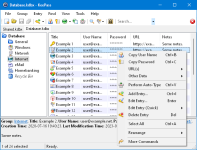
Bildquelle: https://keepass.info/screenshots/keepass_2x/main_big.png
die Changes from 2.60 to 2.61: Neue Funktionen: (vgl. die Changelog) New features:
: mehr 'Infos : Link: https://keepass.info/news/n260304_2.61.html
Zusammenfassend: die wichtigsten Neuerungen von KeePass 2.61 - Basierend auf dem offiziellen Changelog sind dies die Highlights:
The Only KeePass Tutorial You'll Ever Need (Step-by-Step & Beginner Friendly)
Stats: 190 000 views :: 3600 likes :: 411 comments
weitere infos - Download - Hintergründe - Diskussion;
Keepass-Projektseite: https://keepass.info/index.html
Diskussionen https://sourceforge.net/p/keepass/discussion/
Wikiseite über Keepass: https://de.wikipedia.org/wiki/KeePass
drei grundlegende Einführungen - "getting started with keepass":
a. How to Use KeePass: Step-by-Step Guide Published March 4, 2025: https://nerdymishka.com/articles/keepass-a-beginners-guide-to-password-management/
b. KeePass: A beginners guide to Password Management:https://www.techrepublic.com/article/how-to-use-keepass/
c. Getting started with KeePass... https://www.subjectcoach.com/tutori...keepass-a-great-password-management-software/
d....und hier noch...ein interessanter Dialog: Where to store a Keepass password file? Where to store a Keepass password file?
vgl https://askubuntu.com/questions/562879/where-to-store-a-keepass-password-file
Fragen: Wo speichert ihr eure KeePass-Datenbankdateien (und Schlüsseldateien)?
Es ist ja so: Im Grunde hat ja jede Speichermethode ihre Vor- und Nachteile, - hinsichtlich der Themen wie
Portabilität, Verlustrisiko, Zugriff auf die Daten oder auch der Synchronisierung. Last but not least wären dann ja auch noch die Kategorien wie "Backups" und auch "Komfort".
Also - interessant ist die Frage, wo ihr eure KeePass-Datenbankdateien und auch die Schlüsseldateien speichert? Vielen ist ja Sicherheit und (!) Komfort gleichermaßen wichtig.
Wie sind hier eure Vorgehensweisen, wie eure Erfahrungen! Welches Verfahren kommt für euch in Frage!?
Lokaler Speicher: Speichert ihr eure Datenbank und Schlüsseldateien auf eurem lokalen Computer?
Wenn ja, Trefft ihr hier auch noch Sicherheitsvorkehrungen?
Euch allen auf dem Hacker-Forum noch einen schönen Mittwochabend.
rund um die Sicherheitsfragen - mit Workarounds und Plugin-Hinweisen, sowie Anregungen zum Einstieg und zur Einrichtung oder zu Backup-Strategien. guten Abend, liebe Hackerboard-Community,
gute Nachrichten von KeePass.
Die Entwickler: "This is a stable release. It is recommended to upgrade from any previous 2.x version to 2.61. KeePass 2.61 mainly features user interface and integration enhancements, and various other minor new features and improvements. Hashes and signatures for integrity checking are available, and program binaries are digitally signed (Authenticode). New translations are available, too. For a comparison of the current KeePass 1.43 and 2.61, see: Edition Comparison. For details, see the FAQ. KeePass does not contain any malware; here are reports by more than 60 anti-virus programs: VirusTotal Scan, Jotti Scan."
Bildquelle: https://keepass.info/screenshots/keepass_2x/main_big.png
die Changes from 2.60 to 2.61: Neue Funktionen: (vgl. die Changelog) New features:
: mehr 'Infos : Link: https://keepass.info/news/n260304_2.61.html
Added option 'Match diacritics' in the 'Find' dialog (turned off by default, i.e. the search is diacritic-insensitive).
If the option 'Check for update at KeePass startup' is activated, KeePass now initiates the check before trying to open a database (asynchronously); if an update is found while a master key prompt dialog is displayed, the availability of the update is indicated by a banner in the dialog.
When pasting a shared secret in the one-time password generator settings dialog, white-space characters are now removed automatically if the selected encoding is Base16/Hex, Base32 or Base64.
Added buttons in the one-time password generator settings dialog for copying the current one-time password to the clipboard.
The one-time password generator settings dialog now supports displaying settings of history entries.
If the active database is saved to a local file during the last phase of a synchronization, the saved data is now copied to the other involved files (including URLs; this is usually faster than building and saving new files).
The 'Synchronize active database with a file/URL' trigger action now supports synchronizing with multiple files/URLs at once (specify them in the 'File/URL' field, each one enclosed in double quotation marks; if different I/O connection credentials are required, use multiple actions instead).
The 'Synchronize active database with a file/URL' trigger action now supports two new options: 'On error - Silent' and 'On error - Continue' (both turned off by default).
When entering an incorrect master key for confirming an export, KeePass now asks for it again, just as often as when opening a database (customizable using the 'MasterKeyTries' configuration option).
MSI setup: added 'KPS_OPTIONS' property, which allows to customize a (silent) installation (whether to create shortcuts, etc.).
Improvements:
Quick searches, searches in the icon picker dialog, field reference searches, filters in report dialogs and searches in the options dialog are now more tolerant (case- and diacritic-insensitive, current culture rules).
Entry searches now use the rules of the current culture.
Improved activation of an already running KeePass instance.
When switching to a secure desktop, the UAC sound is now played (if the option 'Play UAC sound when switching to secure desktop' is activated) at the system sound volume (instead of the application-specific volume).
Improved database tab tooltip (reduced flickering, etc.).
When closing a database, the view of the next database is now restored.
The {TIMEOTP} placeholder is now classified as non-active (which causes it to be replaced in more situations).
Improved time stability of placeholders during searches for duplicate/similar passwords and password quality reviews.
Improved import/synchronization of multiple files at once.
Improved synchronization error messages.
Improved file transaction error messages.
Improved FTP connection error messages.
Improved parsing of the value of a 'File/URL' or 'Key file' field of a trigger event/condition/action.
Improved workaround for .NET/Windows TopMost/WS_EX_TOPMOST desynchronization bug.
Improved workaround for Mono window minimization bug.
Upgraded installer.
MSI setup: improved shortcut creation/deletion.
Various UI text improvements.
Various code optimizations.
Minor other improvements.
Zusammenfassend: die wichtigsten Neuerungen von KeePass 2.61 - Basierend auf dem offiziellen Changelog sind dies die Highlights:
- Intelligentere Suche: Die neue Option "Match diacritics" (standardmäßig aus) in der Suchfunktion erlaubt jetzt eine akzentunabhängige Suche
- Verbesserungen für Einmalpasswörter (TOTP): Im Einstellungsdialog für den Einmalpasswort-Generator werden beim Einfügen eines "Shared Secrets" nun Leerzeichen automatisch entfernt.
- Stärkere Synchronisation: Die Trigger-Aktion "Synchronize active database with a file/URL" kann jetzt mehrere Dateien/URLs auf einmal verarbeiten (durch Anführungszeichen getrennt). .
- Komfortableres Upgrade-Erlebnis: Wenn die Option "Check for update at KeePass startup" aktiviert ist, prüft KeePass jetzt schon vor dem Versuch, eine Datenbank zu öffnen (asynchron) auf Updates. .
- Verbesserungen für Admins & Profis: Das MSI-Setup bietet nun die neue Eigenschaft 'KPS_OPTIONS' für angepasste (stille) Installationen.
The Only KeePass Tutorial You'll Ever Need (Step-by-Step & Beginner Friendly)
Stats: 190 000 views :: 3600 likes :: 411 comments
weitere infos - Download - Hintergründe - Diskussion;
Keepass-Projektseite: https://keepass.info/index.html
Diskussionen https://sourceforge.net/p/keepass/discussion/
Wikiseite über Keepass: https://de.wikipedia.org/wiki/KeePass
drei grundlegende Einführungen - "getting started with keepass":
a. How to Use KeePass: Step-by-Step Guide Published March 4, 2025: https://nerdymishka.com/articles/keepass-a-beginners-guide-to-password-management/
b. KeePass: A beginners guide to Password Management:https://www.techrepublic.com/article/how-to-use-keepass/
c. Getting started with KeePass... https://www.subjectcoach.com/tutori...keepass-a-great-password-management-software/
d....und hier noch...ein interessanter Dialog: Where to store a Keepass password file? Where to store a Keepass password file?
vgl https://askubuntu.com/questions/562879/where-to-store-a-keepass-password-file
If you mean a KeePass password file, there are several arguments to decide where to store it. In my opinion, if the passwords are really, really important to you, you should make the decision based on:
a. The risk of the file being hacked
b. The risk of losing the file because of disk errors.
c. The risk of burglary / fire
Fragen: Wo speichert ihr eure KeePass-Datenbankdateien (und Schlüsseldateien)?
Es ist ja so: Im Grunde hat ja jede Speichermethode ihre Vor- und Nachteile, - hinsichtlich der Themen wie
Portabilität, Verlustrisiko, Zugriff auf die Daten oder auch der Synchronisierung. Last but not least wären dann ja auch noch die Kategorien wie "Backups" und auch "Komfort".
Also - interessant ist die Frage, wo ihr eure KeePass-Datenbankdateien und auch die Schlüsseldateien speichert? Vielen ist ja Sicherheit und (!) Komfort gleichermaßen wichtig.
Wie sind hier eure Vorgehensweisen, wie eure Erfahrungen! Welches Verfahren kommt für euch in Frage!?
Lokaler Speicher: Speichert ihr eure Datenbank und Schlüsseldateien auf eurem lokalen Computer?
Wenn ja, Trefft ihr hier auch noch Sicherheitsvorkehrungen?
Euch allen auf dem Hacker-Forum noch einen schönen Mittwochabend.
Zuletzt bearbeitet: